ORABPEL-12517 - JCA Adapter Issue : If the eis connection name mentioned in the jca adapter is not available in the server then we will get this exception.
In my current project we have 2 environments for development.
For network issue we cannot use the clients network to develop the interfaces. We cloned the setting from client locally for the faster development , once we done with the development we will move the code to the client environment.
While doing i was hit with an issue. All the partner link URL will be listed in the bpel project bpel.xml file. So i modified all those URL for the client environment and tried deploying to the client environment. I was hit with this issue "ORABPEL-12517 - JCA Adapter Issue".
While compiling to the client network it says compilation fails. I took a close look at the bpel and figured out that the EIS connection used by FTP adapter is different from local environment to the client environment.
Modified it and deployed successfully to the client network.
Showing posts with label Oracle BPEL. Show all posts
Showing posts with label Oracle BPEL. Show all posts
Monday, April 05, 2010

Saturday, January 09, 2010
ORABPEL-01012 : file not found in suitcase description: File \"{0}\" cannot be found in the current suitcase.
When i was working on cloning bpel for various division, i was hit with an issue, i have to the name of the bpel file. Changing bpel name is a big task.
The root cause of the above exception is basically the bpel name is associated with lot of message names, variable names and wsdl names etc.,
So you should take care of them in your ant script.
If you get the above error, check the above names.
The root cause of the above exception is basically the bpel name is associated with lot of message names, variable names and wsdl names etc.,
So you should take care of them in your ant script.
If you get the above error, check the above names.
Monday, November 23, 2009
Exception message is: javax.resource.ResourceException: RollbackException: Transaction has been marked for rollback: Timed out
Problem:
When i try to deploy a bpel which is of 30kb size using JDeveloper it was throwing "Exception message is: javax.resource.ResourceException: RollbackException: Transaction has been marked for rollback: Timed out" Exception.
"ORABPEL-04077
Cannot fetch a datasource connection.
The process domain was unable to establish a connection with the datasource with the connection URL "jdbc/BPELServerDataSource". The exception report
ed is: javax.resource.ResourceException: RollbackException: Transaction has been marked for rollback: Timed out"
The JDeveloper/Ant script will take too much time and finally it will say failed to deploy.
SOA Suite Version: 10.1.3.4 and JDeveloper Version : 10.1.3.4.0.4270
Fix: To fix this issue i have to revisit some of the configuration files on the server.
1. Open the transaction-manager.xml file using some editor.
Path for the file :\j2ee\oc4j_soa\config\transaction-manager.xml
Modify the transaction-timeout attribute value to some higher value, i have set the value as transaction-timeout="7200".
2. Open the orion-ejb-jar.xml file using editor
Path for the file :\j2ee\oc4j_soa\application-deployments\orabpel\ejb_ob_engine\orion-ejb-jar.xml
Modify the transaction-timeout attribute, with some higher value.
I have set the value as transaction-timeout="3600".
Note: There will be 6 entries of transaction-timeout attributes. Make sure you change in all the 6 attributes.
3. Reboot the system or only the particular component.
> opmnctl restartproc process-type=oc4j_soa
4. You can deploy now using JDeveloper or ant script.
When i try to deploy a bpel which is of 30kb size using JDeveloper it was throwing "Exception message is: javax.resource.ResourceException: RollbackException: Transaction has been marked for rollback: Timed out" Exception.
"ORABPEL-04077
Cannot fetch a datasource connection.
The process domain was unable to establish a connection with the datasource with the connection URL "jdbc/BPELServerDataSource". The exception report
ed is: javax.resource.ResourceException: RollbackException: Transaction has been marked for rollback: Timed out"
The JDeveloper/Ant script will take too much time and finally it will say failed to deploy.
SOA Suite Version: 10.1.3.4 and JDeveloper Version : 10.1.3.4.0.4270
Fix: To fix this issue i have to revisit some of the configuration files on the server.
1. Open the transaction-manager.xml file using some editor.
Path for the file :
Modify the transaction-timeout attribute value to some higher value, i have set the value as transaction-timeout="7200".
2. Open the orion-ejb-jar.xml file using editor
Path for the file :
Modify the transaction-timeout attribute, with some higher value.
I have set the value as transaction-timeout="3600".
Note: There will be 6 entries of transaction-timeout attributes. Make sure you change in all the 6 attributes.
3. Reboot the system or only the particular component.
> opmnctl restartproc process-type=oc4j_soa
4. You can deploy now using JDeveloper or ant script.
XPath expression failed to execute. Error while processing xpath expression
If you get this exception while deploying your bpel process, there could be some issue with the xsl file that you have in your bpel process.
To fix this issue, open your bpel process in IDE and double click on the transform activity and click on source part payload and target part payload. Then you deploy.
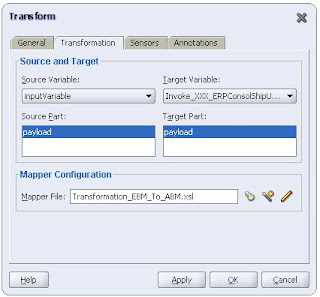
Before loading the source part and target part if you close the transform box, these kind of issues will stop you from deploying.
To fix this issue, open your bpel process in IDE and double click on the transform activity and click on source part payload and target part payload. Then you deploy.

Before loading the source part and target part if you close the transform box, these kind of issues will stop you from deploying.
Tuesday, May 26, 2009
How to add an external XSD file to a BPEL project
Create a BPEL Project, then add the external XSD to your bpel project, inside the bpel folder. Open the bpel file in jdeveloper,
Then in the structure window travel to the messages folder.
By default you can see 2 messages one for request and another for response. If you want to use the custom xsd to the request message type.
Edit the request type to map to the external XSD node. Then refresh the strucure window.
Sometimes the structure window won't get refreshed, in that case you can relaunch the bpel process. This will load the current messages to the structure window.
Messages can be mapped to a element or type based on the struture of the XSDs.
If the node that you are mapping to the message type is element map it as element or if it is type ie.., complex type,
map it as message type otherwise there will be type mismatch and compilation error will be thrown. Once you done mapping to the custom xsd, you can check that in the
structure window.
Then in the structure window travel to the messages folder.
By default you can see 2 messages one for request and another for response. If you want to use the custom xsd to the request message type.
Edit the request type to map to the external XSD node. Then refresh the strucure window.
Sometimes the structure window won't get refreshed, in that case you can relaunch the bpel process. This will load the current messages to the structure window.
Messages can be mapped to a element or type based on the struture of the XSDs.
If the node that you are mapping to the message type is element map it as element or if it is type ie.., complex type,
map it as message type otherwise there will be type mismatch and compilation error will be thrown. Once you done mapping to the custom xsd, you can check that in the
structure window.
Thursday, January 08, 2009
If a bpel fails to create any instance you can take a look at the "View Process Log", its a worth try.
Click on this link "View Process Log" to get the failed bpel information.
In one of my project i was working with AQ, when we try to move the code from DEV to TEST, we were hit with this issue.
We have every thing in place, we have created AQ and we have created the required DataSource and when we push message to the AQ.
The BPEL is not picking up the AQ Message, we checked each and every thing that we could.
We looked at all the logs from the server and we couldnt identify the issue. Then i clicked on the view process log. We got the below exception.
"ORA-06550: line 1, column 7: PLS-00201: identifier 'DBMS_AQIN' must be declared ORA-06550: line 1, column 7: PL/SQL: Statement ignored"
Basically we dont have the permission to dequeue, because of the above permission is not there for that user. Once we granted for this user. we were able to
goahead with our testing.
In one of my project i was working with AQ, when we try to move the code from DEV to TEST, we were hit with this issue.
We have every thing in place, we have created AQ and we have created the required DataSource and when we push message to the AQ.
The BPEL is not picking up the AQ Message, we checked each and every thing that we could.
We looked at all the logs from the server and we couldnt identify the issue. Then i clicked on the view process log. We got the below exception.
"ORA-06550: line 1, column 7: PLS-00201: identifier 'DBMS_AQIN' must be declared ORA-06550: line 1, column 7: PL/SQL: Statement ignored"
Basically we dont have the permission to dequeue, because of the above permission is not there for that user. Once we granted for this user. we were able to
goahead with our testing.
How to append content to a file while using file adapter in bpel
Modify the fileadapter wsdl with append="true" in the jca tag.
This will append the messages comes into the file.
jca:operation
LogicalDirectory="oc4j_soa"
InteractionSpec="oracle.tip.adapter.file.outbound.FileInteractionSpec"
FileNamingConvention="arrow_SW_IN_ORDER_CONTROLLER_OC4J_soa.log"
OpaqueSchema="false"
Append="true"
This will append the messages comes into the file.
jca:operation
LogicalDirectory="oc4j_soa"
InteractionSpec="oracle.tip.adapter.file.outbound.FileInteractionSpec"
FileNamingConvention="arrow_SW_IN_ORDER_CONTROLLER_OC4J_soa.log"
OpaqueSchema="false"
Append="true"
Wednesday, October 22, 2008
"URI is not hierarchical Error"
One of my colleague was hit with this issue and helped him to resolve.
Check the following to fix this issue.
a. Check the path of your jdevleoper and your project names.
The path of the jdeveloper should not have spaces between then like the example given below.
"c:\Program Files\Jdeveloper\jdev"
or Your project name should not have something like "SOA Samples"
This will create project while deploying the bpel projects.
b. WSDL with multiple namespaces using RPC/Literal didn't work on JDeveloper version 10.1.3.2, but works with 10.1.3.1
Same namespaces may have multiple prefixes in partner link wsdl or wsdls.
Please check on this.
You should be able to fix the issue.
Check the following to fix this issue.
a. Check the path of your jdevleoper and your project names.
The path of the jdeveloper should not have spaces between then like the example given below.
"c:\Program Files\Jdeveloper\jdev"
or Your project name should not have something like "SOA Samples"
This will create project while deploying the bpel projects.
b. WSDL with multiple namespaces using RPC/Literal didn't work on JDeveloper version 10.1.3.2, but works with 10.1.3.1
Same namespaces may have multiple prefixes in partner link wsdl or wsdls.
Please check on this.
You should be able to fix the issue.
Monday, March 17, 2008
BPEL Tips
1. Whenever you use a custom xsd file, drop the file under the bpel folder inside the project folder. So that you can avoid some compilation errors. After copying the xsd and you have defined the request and response according to that, and if you are not able to see those values in structure window under the variables. Even after you did couple of time refresh, restart the JDeveloper. I hope this issue is fixed in Jdev 11g, i havent tried. If you have tried this, please update me with your comments.
2. Whenever you are using the EMAIL functionality of the BPEL process, dont forget to mention the from account, if you are using the from account as "Default" make sure the first letter in CAPS, otherwise the the bpel process will not throw any error message, but the mail will not be sent.
2. Whenever you are using the EMAIL functionality of the BPEL process, dont forget to mention the from account, if you are using the from account as "Default" make sure the first letter in CAPS, otherwise the the bpel process will not throw any error message, but the mail will not be sent.
Subscribe to:
Posts (Atom)